
Intel UHD Graphics is the GPU most emulator users actually own — it ships in the Core i3/i5/i7 laptops that fill offices and classrooms — and it plays by different rules than the discrete cards most settings guides are written for. The defining traits of UHD 620/630 and their Iris Xe successors are shared memory (your system RAM is the VRAM), a shared thermal envelope with the CPU, and drivers whose quality varies sharply by generation. Tuning emulator settings intel uhd graphics means optimizing for those three traits, not copying a GTX settings page and lowering things at random.
Know Which Intel GPU You Actually Have
| GPU | Found in | Emulation character |
|---|---|---|
| HD 520 / 620 | 6th–7th gen Core laptops | 720p ceiling for 3D games; OpenGL driver is the weak path |
| UHD 620 / 630 | 8th–10th gen Core | 720p comfortable, 900p in lighter titles; driver branch matters |
| Iris Plus G7 | 10th gen Ice Lake | A step up — more execution units pay off in fill rate |
| Iris Xe (80/96 EU) | 11th–13th gen Core i5/i7 | Genuinely capable: 900p–1080p in many popular titles; Vulkan driver is solid |
| Intel Arc iGPU (Meteor Lake+) | Core Ultra laptops | Modern architecture; treat like a low-end discrete GPU |
Check yours in Task Manager > Performance > GPU — the model name and the “shared GPU memory” figure are both shown. Also confirm dual-channel RAM: integrated graphics feed from system memory, and a single 8GB stick (single-channel) can cost an iGPU 20–40% of its throughput versus two matched sticks. On UHD laptops, a second RAM stick is a GPU upgrade.
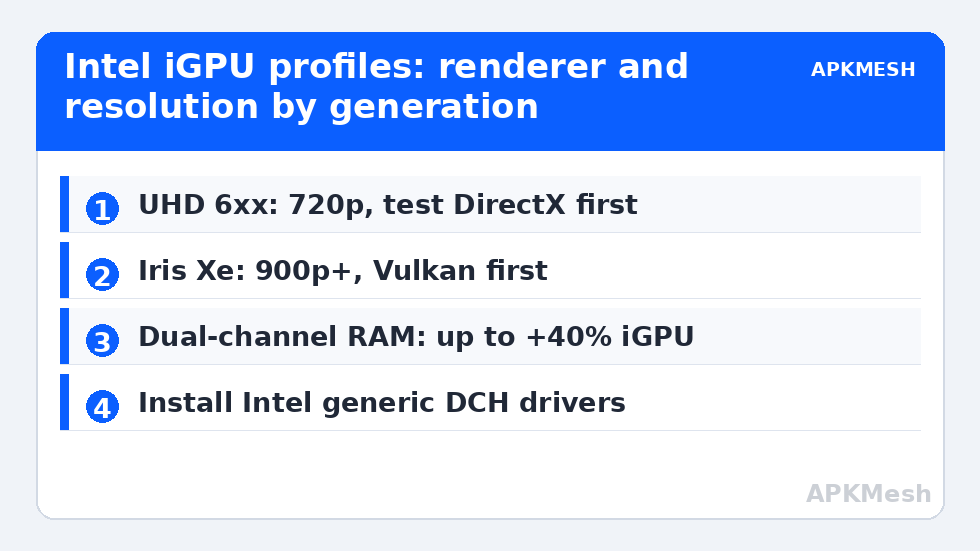
Emulator Settings Intel UHD Graphics: Profile for UHD 620/630
- Resolution: 1280×720 (1600×900 only for 2D or very light 3D games), 240 DPI.
- Allocation: half your threads, RAM per the table in allocating CPU and RAM (typically 4GB guest on an 8–16GB system).
- Renderer: test DirectX first on HD/UHD 6xx — Intel’s legacy Windows OpenGL driver is the family’s known weak spot; Vulkan where the emulator and title support it cleanly. Full reasoning in the renderer comparison.
- ASTC: software decoding. Hardware texture paths on these drivers are a recurring stutter source.
- FPS cap: 60. Do not chase 90 on this class outside of 2D titles (see high refresh guidance for what each tier costs).
- In-game: shadows off, render scale 90–100%, textures medium, AA off.
Lag risk: —
Iris Xe: The Settings Change
Iris Xe’s extra execution units and better drivers move the goalposts: 1600×900 becomes the default recommendation, 1920×1080 is viable in MOBAs, racers, and lighter shooters, Vulkan becomes the first-choice renderer (Intel’s Xe Vulkan driver is maintained and performant), and 90 FPS tiers are realistic in lighter competitive titles at 900p. Keep ASTC on hardware decoding here, and keep the same thermal discipline — Xe shares the CPU’s cooling, so a laptop that boosts gloriously for six minutes and throttles is a fan-curve problem, not a settings problem.
Driver Strategy: The Highest-Leverage Fix
Intel’s generic DCH drivers from intel.com (“Intel Graphics Driver” / Arc & Iris Xe packages) are almost always newer than the laptop vendor’s frozen release, and emulator-specific fixes land in them. Install the generic driver unless your vendor explicitly customizes graphics switching on your model. In the Intel Graphics Command Center / Intel Graphics Software, set the 3D preference to Performance and disable adaptive tessellation-style “enhancements” — application-controlled is the safe global. One warning: Windows Update periodically overwrites Intel drivers with its own older branch; if an emulator suddenly regresses after a Windows update, the graphics driver version is the first thing to check.
Windows Graphics Settings for iGPU Systems
- Settings > System > Display > Graphics: add your emulator’s executable and set it to High performance. On iGPU-only machines this mainly stops Windows from parking the GPU aggressively; on dual-GPU laptops it forces the discrete card instead — choose deliberately per title.
- Power mode: Best Performance while plugged in; iGPU clocks are power-plan hostages on battery.
- Game Mode: on is fine on modern Windows builds; the old advice to disable it predates its fixes.
- Variable refresh / panel rate: set the panel to its full Hz so emulator caps can reach it (chain explained in the high-refresh guide linked above).
For whole-emulator configurations beyond graphics, see the per-app setups like our LDPlayer 4GB laptop profile and more in Emulator Settings.
Memory Bandwidth: The Metric Intel Doesn’t Print on the Box
Two laptops with the “same” UHD 630 can perform 30% apart in emulators, and the difference is almost never the GPU silicon — it is the memory subsystem feeding it. Integrated graphics borrow both capacity and bandwidth from system RAM, so a machine with DDR4-2400 in single channel starves the same iGPU that DDR4-3200 in dual channel feeds comfortably. When comparing your results against any settings guide (including this one), calibrate expectations by your RAM configuration first: single-channel owners should start one resolution tier below the table, dual-channel owners can start at it. This also explains why emulator performance guides contradict each other so confidently — the testers’ memory subsystems differed more than their settings did.
Thermal Behavior Specific to Slim Laptops
UHD-class laptops are typically thin designs whose fans serve one shared heat pipe for CPU and iGPU. Emulator loads are unusually cruel to this arrangement because they load both simultaneously and continuously. The practical counters: cap emulator FPS at 60 so neither component sprints, elevate the laptop’s rear for intake air, and prefer a cooling pad’s airflow over any software “fan boost” that mostly adds noise. If your machine sustains clocks for exactly one match length, treat session structure as a setting — a two-minute emulator-idle break between matches measurably restores the next match’s frame rate on thermally limited designs.
A Five-Minute UHD Baseline Test
To find your machine’s personal ceiling without guesswork, run this once: pick your most-played game, set the emulator to 720p/240DPI with the renderer this guide prescribes for your chip, play the busiest repeatable scene for five minutes, and note the FPS range and how the laptop feels (fan noise is data). Raise resolution one tier and repeat. The tier where the sustained low end of the range falls below your comfort line is your ceiling; lock the tier below it and stop optimizing. Re-run the test after driver updates or emulator upgrades — ceilings move — and after any RAM change, which on iGPU systems is effectively a GPU change too.
Frequently Asked Questions
Can Intel UHD 620 run emulators at 60 FPS?
Yes, in light and mid-weight games at 720p with DirectX or OpenGL chosen per title, software ASTC decoding, and shadows off. Heavy open-world 3D titles will sit below 60 regardless of tuning — the iGPU’s fill rate and shared memory bandwidth are the hard limits.
Why does dual-channel RAM matter so much for Intel graphics?
Integrated GPUs use system RAM as video memory. A single memory stick halves the bandwidth available to feed the GPU, costing up to 20–40% of iGPU throughput in bandwidth-bound scenes. Adding a matched second stick is the cheapest real “GPU upgrade” for these laptops.
OpenGL, DirectX or Vulkan on Intel UHD?
On HD/UHD 6xx, test DirectX first — Intel’s older Windows OpenGL driver is notoriously weak, and several emulators’ DX paths run cleaner. On Iris Xe, Vulkan is the first choice. Always decide per game after a 15-minute test, and clear the game cache after switching.
Should I install Intel’s generic driver or keep the laptop maker’s?
Install Intel’s generic DCH driver in almost all cases: it is newer and receives emulator and game fixes the OEM package never gets. The exception is a laptop whose vendor customizes GPU switching — check the vendor’s notes for your model first.
Why does performance drop after a Windows update?
Windows Update sometimes replaces the Intel graphics driver with an older Microsoft-branch version. Check the driver version in Device Manager after any suspicious regression and reinstall the current Intel package if it changed.