
Mid-match, your character stops responding. The controller’s light is still on, Windows still lists it — but the emulator has silently let go, and by the time you alt-tab to investigate, the round is lost. If you need to fix controller disconnection bugs while playing via emulators, start from the pattern: disconnects are rarely random. They follow power management (Windows putting the “idle” controller or its USB port to sleep), wireless interference, a cable that flexes, or the emulator losing the device when focus changes. Each pattern has a signature and a fix, and this guide maps them one to one.
Read the Pattern Before Touching Settings
- Drops after a fixed idle period (5–15 min) or when you stop pressing buttons: power management — Windows or the controller itself sleeping.
- Drops during frantic input, fine in menus: wireless congestion, low battery under load, or a cable that fails when it moves.
- Drops exactly when you alt-tab, click a second monitor, or a notification steals focus: emulator focus handling or the controller being re-enumerated by Windows.
- Drops correlate with big in-game moments and PC fan noise: USB power delivery sagging under system load, or an unpowered hub giving up.
- Only in one emulator; fine in Windows games: that emulator’s controller layer or its settings.
Fix 1: Stop Windows From Sleeping the Controller and Its Ports
- Device Manager → Universal Serial Bus controllers → for each USB Root Hub / Generic USB Hub: Properties → Power Management → uncheck “Allow the computer to turn off this device to save power.”
- Same for the controller itself under Human Interface Devices / Bluetooth (for wireless): find the game controller and its Bluetooth radio entries and uncheck the same box where present.
- Settings → System → Power → Screen and sleep: while testing, set USB-related sleep out of the picture by keeping the PC awake; then Control Panel → Power Options → Change plan settings → Advanced → USB settings → USB selective suspend: Disabled (at least for plugged-in).
- For Xbox-style controllers, also disable the per-device power-down in Device Manager under “Xbox Peripherals” if present.
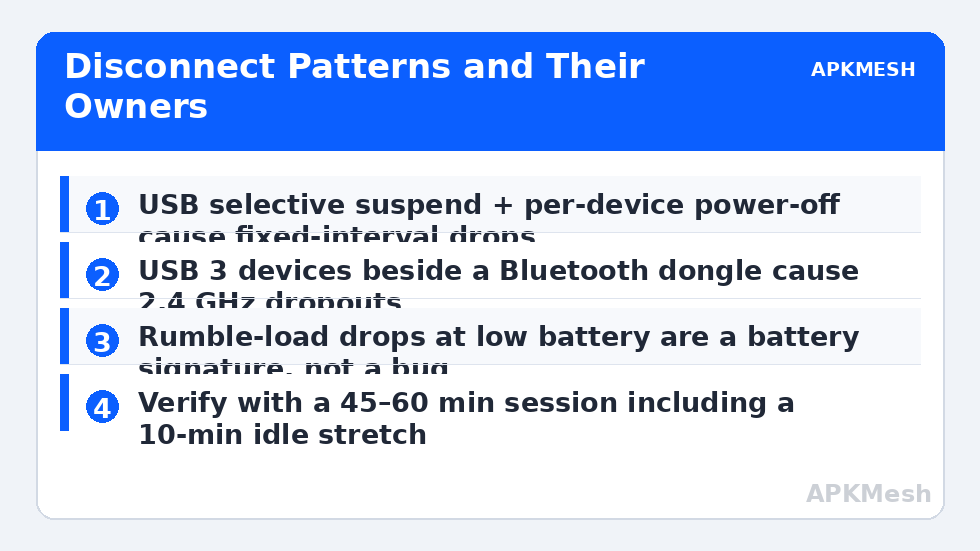
This single fix resolves the fixed-interval drops entirely. It slightly increases idle power draw — negligible on a desktop, and on a laptop it only matters on battery, where you should not be running emulator sessions anyway.
Fix 2: Wireless Done Right (Bluetooth and 2.4 GHz)
- Distance and line of sight: Bluetooth gamepads are Class 2 devices with optimistic range claims. Keep the PC (or its Bluetooth antenna) within ~3 metres and unobstructed; a PC under a metal desk with the antenna at the back is a Faraday cage with ambitions.
- Interference: USB 3.0 ports and unshielded USB 3 cables emit noise in the 2.4 GHz band — a classic cause of Bluetooth dropouts when an external drive is plugged in beside the receiver. Move the dongle to a USB 2.0 port or a short extension cable away from USB 3 devices.
- Battery: a controller at 20% battery holds a connection in menus and drops it under rumble load. Test fully charged or wired before deeper diagnosis. Rumble-heavy moments correlating with drops is the signature — reduce rumble intensity as a test.
- Re-pair cleanly: remove the controller from Windows Bluetooth devices, restart Bluetooth (or the PC), and pair fresh — stale pairing records cause repeat mid-session drops.
- Firmware: update the controller firmware via the manufacturer’s app (Xbox Accessories, DualSense firmware updater) — connection stability is a recurring firmware fix.
If your controller drops in all Windows games too, the fault is this layer or the hardware, and the emulator is innocent. If drops only happen in emulators, continue down. Related input misery — a vanishing mouse in fullscreen — lives in the disappearing cursor guide, and both faults often trace back to the same window-focus behaviour.
Fix 3: Cables, Ports, and Hubs
Wired is not automatically innocent. Test with a different, known-good data cable (many bundled cables are charge-only or worn at the connector), plug directly into a rear motherboard port instead of a front-panel or hub port, and if you must use a hub, use a powered one. Wiggle-test gently: if a slight cable movement drops the device, you have found a hardware fault that no setting will fix — replace the cable before anything else. Load-related drops on unpowered hubs disappear the moment the hub gets its own power supply.
One environmental check: an instance starved of CPU can drop input events under load and feel exactly like disconnection. If the “disconnects” coincide with frame-rate collapse, validate resources first:
Lag risk: —
Fix 4: Emulator-Side Controller Handling
- Focus the game window: some emulators pause device polling when unfocused. If drops happen on alt-tab, check the emulator’s settings for background behaviour and run borderless rather than exclusive modes that re-grab devices on refocus.
- One input layer at a time: if you also run controller-remapping software (Steam Input, reWASD-type tools, vendor suites), the layers can fight over the device and drop it from the emulator. Test with remappers closed; if that cures it, configure the remapper to ignore the emulator or use only the emulator’s built-in mapping.
- Re-detect in the emulator: most emulators list the gamepad in their controller/keymapping panel — if it is missing there while Windows sees it, reconnect it with the emulator in focus and re-check; per-emulator quirks in detection are common after Windows sleep.
- Sleep/wake hygiene: after Windows wakes from sleep, unplug/re-pair the controller before launching. USB device states after sleep are a swamp; a fresh enumeration avoids the weirdest half of this fault class.
How to Verify the Fix
Play for at least 45–60 continuous minutes including an idle stretch (leave the character standing somewhere safe for ten minutes — the power-management fault needs idle to strike) and several high-input sequences. Then deliberately alt-tab and return. Zero drops across that session, repeated on a second day, is a fix. A single good ten minutes proves nothing for an intermittent fault.
When This Will Not Work
A controller with a failing radio, worn connector, or dying battery is a hardware replacement, not a settings problem — if it drops on another PC too, believe it. Extremely congested RF environments (dense apartments, event venues) can defeat Bluetooth regardless; wired play is the engineering answer. And a small set of emulator builds have known controller bugs in specific versions — if your version’s community reports the identical drop pattern, updating (or rolling back one version) is the fix. The rest of the input and stability faults sit in the lag and error fixes section.
Frequently Asked Questions
Why does my controller disconnect only when I stop pressing buttons?
Power management. Windows or the controller interprets inactivity as a chance to sleep the device or its USB port. Disable selective suspend and the per-device “turn off to save power” options — that pattern is their signature.
Is wired really more reliable than Bluetooth for emulator play?
Yes, measurably: no pairing, no RF interference, no battery sag, and lower latency. Bluetooth done well (short range, good antenna placement, charged battery) is perfectly playable, but wired removes the whole category of faults in this guide.
The controller stays connected to Windows but the emulator loses it. Why?
The emulator’s device layer dropped it — commonly after a focus change, a Windows sleep event, or a remapping tool grabbing the device. Re-detect it in the emulator with the window focused, and test with remappers closed.
Could my USB hub be the problem even though other devices work?
Yes. Controllers are sensitive to power dips and reconnection events that a keyboard shrugs off. An unpowered hub under GPU-load power draw is a classic culprit; plug the controller (or a powered hub) directly into the motherboard.
Do controller firmware updates actually matter?
For connection stability, genuinely yes. Manufacturers ship Bluetooth stack, sleep-behaviour, and compatibility fixes in controller firmware. It is a five-minute step that permanently removes some drop patterns.