Most emulator advice assumes landscape, because most emulator marketing is shooters. But a large slice of phone life is vertical: short-video apps, social feeds, comics and manga readers, portrait puzzle games, and a generation of vertical shooters and runners designed for a thumb, not a mouse. Setting up emulator portrait vertical mode properly is more than rotating a window — resolution and DPI swap roles, keymapping logic inverts, and Windows window management starts fighting you. This guide configures portrait instances deliberately, on the low-end laptops where a spare light instance for vertical apps is often the smartest second window on the PC.
Portrait Is a Different Instance, Not a Rotation
The cleanest approach on weak hardware is a dedicated portrait instance rather than flipping your landscape gaming instance back and forth. Every flip forces resolution changes, HUD re-layouts, and keymapping swaps, and something always ends up forgotten. A small, permanent portrait instance — two cores, 2GB of RAM, modest storage — sits happily beside your main instance or alone on the desktop, purpose-built for feeds and reading, and never asks your shooter profile to compromise.
Create it as a Pie 64-bit or Android 11 instance depending on your apps’ minimum versions, then set the display before installing anything: games and readers often cache their layout assumptions at first launch, and a title first opened in landscape may keep stretched assets until its data is cleared.
The Numbers: Resolution and DPI, Swapped
| Setting | Portrait value | Reason |
|---|---|---|
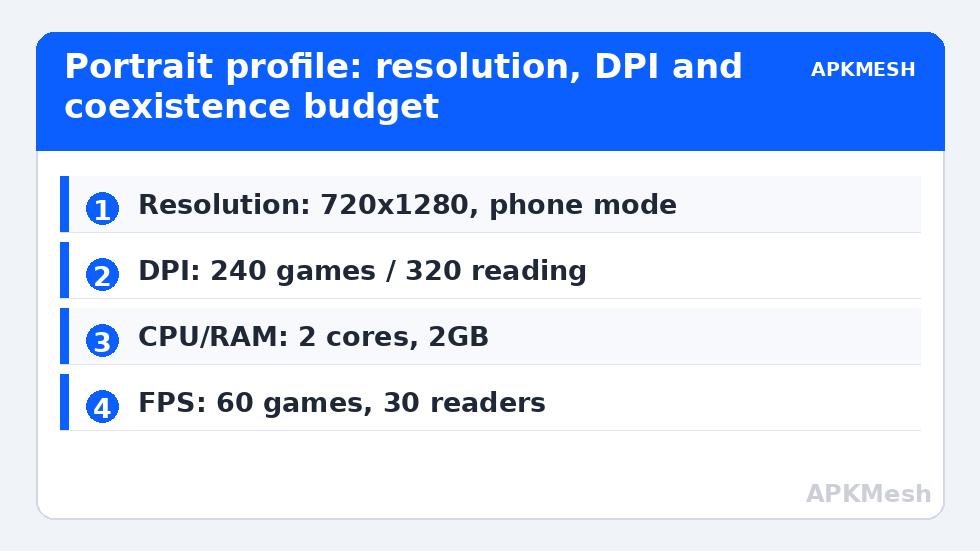
| Resolution | 720×1280 (or 900×1600 on stronger iGPUs) | True 9:16 canvas; video and comics assume it |
| DPI | 240–320 | Higher end for reading apps, lower for games |
| Display mode | Phone, portrait locked | Prevents apps re-laying out on window resizes |
| CPU / RAM | 2 cores / 2GB | Feeds, readers and portrait games are light |
| Frame cap | 60 for games, 30 for readers and feeds | Scrolling smoothness without wasted GPU |
The relationship between these numbers mirrors the landscape logic in our resolution and DPI guide for wide monitors, with the axes exchanged: resolution still sets the GPU cost, DPI still sets how large interface elements draw. For reading, DPI is the setting you will feel most — a manga page at 240 DPI on a 24-inch monitor asks your mouse to travel and your eyes to work harder than the same page at 320.
Lag risk: —
Window Management on a Landscape Monitor
A 720×1280 window on a 1080p landscape screen stands tall and thin, and Windows will keep trying to be helpful with snapping and taskbar space. Practical habits: park the portrait window against one screen edge at a fixed size and let your browser or main instance own the remaining width; disable the emulator’s always-resize behaviours where offered; and learn your emulator’s boss key or quick-hide if the instance is a personal feed living on a work screen. On multi-monitor setups, portrait instances are the rare workload that genuinely suits an old secondary monitor rotated physically — if you have one in a cupboard, this is its second career.
Scrolling is the other window-level concern. Feeds and readers live on scroll input, so map the mouse wheel generously and test scroll smoothness early; a portrait game with perfect frames but juddering feed scroll still feels broken. If wheel scroll stutters while drag scroll is smooth, the app is the variable, not your settings — several social apps simply handle wheel events poorly, and a mapped drag key is the honest workaround.
Controls for Games Designed Around a Thumb
Portrait games assume one or two thumbs: drag to steer, tap to act, swipe for specials. Translate by verb, not by position. Drag steering maps to holding the left mouse button or to WASD-style keys if the game reads directional drags; rapid tapping maps to a key with a comfortable repeat, not to mouse clicks your finger will regret; swipe gestures map to the emulator’s swipe tool bound to keys, with distance tuned per game — a short flick and a full-screen swipe are different moves wearing the same name.
Keep portrait keymapping schemes in their own named profiles, exactly as you would for landscape titles; the discipline in emulator per-game profile settings applies unchanged, including exporting schemes before game updates. And resist importing a landscape scheme sideways: nothing in it survives rotation except your disappointment.
Video, Comics and the Reading Workloads
- Short-video apps: 720×1280 with a 60 cap scrolls the way the apps were designed to feel; hardware video decode on any modern iGPU handles the rest.
- Comics and manga: raise DPI before resolution if text looks small; raise resolution first if line art looks soft. They are different complaints with different cures.
- E-books: the lightest workload an emulator will ever see — a 30 FPS cap and Eco-style throttling keep a reading instance essentially free beside other work.
- Portrait productivity: banking and authenticator-style apps may refuse emulator environments entirely; that is the app’s policy, not a settings failure, and no display value changes it.
For many readers this portrait instance quietly becomes the most-used window on the machine, precisely because it was specced honestly for light work instead of borrowed from a gaming profile. It is also the friendliest possible second instance for the sync and clone workflows discussed elsewhere in this category on APKMesh.
Running Portrait Beside Your Main Instance
The coexistence question deserves its own arithmetic, because a portrait instance is the most common second instance a low-end PC will ever host. Budget it as a genuine instance, not a free one: two threads, 2GB of RAM, and a slice of the shared GPU for its scrolling and video decode. Combined with a main gaming instance at four threads’ pressure and 4GB, an 8GB machine stays below the paging line as long as the portrait side sticks to its light brief — the full budgeting method in running multiple instances without crashing applies, with the portrait instance cast permanently in the throttled-follower role. The failure mode to avoid is mission creep: the feed instance that gradually acquires a demanding portrait game, a second video app, and a 60 FPS habit stops being the cheap companion it was specced to be.
Launch order helps too. Start the main instance first and let it settle, then open the portrait window; simultaneous cold boots storm the disk together for no benefit. Once both are resident, the portrait instance’s cost is mostly its RAM reservation, which is precisely the resource its 2GB discipline protects.
Troubleshooting the Three Portrait Complaints
Nearly every portrait support question reduces to one of three faults. Blurry text at a distance is a DPI value set for games being asked to serve reading — raise it toward 320 and restart the instance. A game window that keeps snapping back to landscape is an orientation lock unset or an app that requested landscape at launch; lock portrait in the emulator and clear that app’s data once. Juddering feed scroll with healthy frame rates is almost always the app’s own handling of wheel input, answered by the drag-key mapping described earlier. Diagnose in that order and most portrait instances are one setting away from boring reliability, which is the correct final state for a window you intend to glance at fifty times a day.
Frequently Asked Questions
What resolution should a portrait emulator instance use?
720×1280 at 240-320 DPI is the reliable default for low-end PCs – a true 9:16 canvas that video apps, comics, and portrait games all expect. Stronger integrated graphics can run 900×1600, but the extra pixels mostly matter for reading line art, not for feeds or casual games.
Should portrait apps share my landscape gaming instance?
A separate small instance works better. Flipping one instance between orientations forces resolution, layout, and keymapping changes every time, while a dedicated portrait instance with 2 cores and 2GB stays configured correctly forever and costs very little to keep beside your main instance.
Why does my portrait app show stretched or letterboxed content?
It cached its layout at first launch or it expects a slightly different aspect ratio. Set the portrait resolution before first opening the app, lock orientation to portrait in the emulator, and if the stretch persists, clear that app’s data so it re-reads the display on its next launch.
How do I map controls for portrait games built for thumbs?
Translate by action rather than position: drag steering becomes a held mouse button or directional keys, rapid taps become a single comfortable key, and swipes become the emulator’s key-bound swipe tool with its distance tuned per game. Save each result as its own named profile.
Can a portrait instance run beside my main instance on 8GB RAM?
Yes – that is one of its advantages. A portrait instance at 2 cores, 2GB and a 30-60 FPS cap is light enough to coexist with a main gaming instance on an 8GB machine, especially if the portrait side is reading or feeds rather than a second demanding game.