
Your emulator lives everywhere and nowhere: its clock may follow your laptop, its GPS may point at a default city on another continent, and its sensors may report a device that never moves, never tilts, and has been at 100 percent battery since installation. Most games never care. Then you meet the app that schedules by timezone, the game whose day resets at a server hour your instance displays wrongly, or the fitness and augmented-reality title that reads your stillness as cheating. Configuring emulator location timezone sensor settings is about making each instance’s story about where and when it is consistent — because apps rarely punish a location, but they constantly notice contradictions.
Timezone: The Small Setting With Daily Consequences
Start with time, because it breaks things quietly. Emulators usually inherit the host’s timezone, but instances restored from backups, cloned from a master built elsewhere, or created under a different Windows account can carry a stale zone. Symptoms are distinctive: daily rewards resetting at odd hours, calendar and reminder apps offset by a fixed number of hours, event timers disagreeing with the same game on your phone. Inside Android’s settings, set the timezone manually to your real zone rather than trusting automatic detection, which in an emulator often resolves through the network identity rather than your actual location.
Resist the temptation to timezone-hop for reward advantages in live-service games. Publishers treat deliberate clock and region manipulation as exploitation in many titles’ rules, the gains are trivial, and the account risk is not. Set your true zone once, in every instance, and let daily resets be boring. Boring is what healthy configuration looks like from the outside.
Location: Virtual GPS and Its Honest Uses
| Tool | What it does | Sensible use |
|---|---|---|
| Emulator location panel (map picker) | Sets the coordinates the guest reports as its GPS fix | Placing the instance in your own city for weather, local content, and app testing |
| Route / movement simulation | Moves the reported position along a path at walking speed | Development and testing of location-aware features |
| Windows location services | The host’s own location answer | Keep consistent with the guest’s story where apps cross-check |
| IP-based location | What servers infer from your connection | Cannot be set in the emulator; explains many region contradictions |
The legitimate centre of this feature is coherence: an instance set to your own city gives correct weather, correct local search, and correct behaviour in the long tail of apps that quietly use location for content rather than gameplay. The further an instance’s claimed GPS sits from what its IP address, timezone, and language settings imply, the more systems — fraud checks, region locks, content libraries — begin disagreeing with each other. Match the whole stack to where you actually are, and almost every location feature simply works. The networking half of that coherence is covered in the NAT vs bridge guide, since your network identity is one of the witnesses apps consult.
Lag risk: —
Location-Based Games: A Clear Boundary
One paragraph of plain dealing, because this topic attracts spoofing questions. Using virtual location to fake movement in location-based games — the genre built entirely around physically travelling — violates those games’ terms in essentially every case, is actively detected through exactly the contradictions described above (impossible speeds, GPS/IP mismatches, sensor stillness), and results in bans that include otherwise innocent accounts played from the same instance. This guide does not cover it because there is no safe settings version of it; the feature’s respectable uses are coherence, privacy from apps that over-ask, and development testing. If a game’s entire design is walking, the emulator is simply the wrong venue for it, in the same way an emulator is the wrong venue, as the ADB and root settings guide in this category explains, for apps that require certified hardware.
Sensors: The Device That Never Moves
Emulators synthesise sensor data, and the synthesis is detectable in its perfection: an accelerometer reporting mathematically still readings for hours, no step counter movement, a battery that never drains, sometimes a missing gyroscope on builds that emulate a narrow device. Most apps sample sensors lazily and never notice. The ones that do are fitness apps (which may undercount or refuse emulator environments), tilt-controlled games (which need the emulator’s sensor panel or a phone-as-controller feature to be playable at all), and AR titles (which combine camera, gyroscope, and location into requirements an emulator structurally cannot meet honestly).
Practical settings work here is modest but real. Where your emulator offers sensor simulation — shake gestures, tilt via keyboard, or a companion phone app acting as the sensor source — configure it for the tilt games you actually play, and accept fitness and AR as phone workloads. Battery reporting deserves one check too: a few apps behave oddly when an instance reports permanent full charge with no charger state changes, and while there is rarely a setting to fix it, recognising the pattern saves a pointless reinstall. As with device identity in device profile settings, the goal is a consistent, plausible device story rather than a maximal one.
A Coherence Checklist for Every New Instance
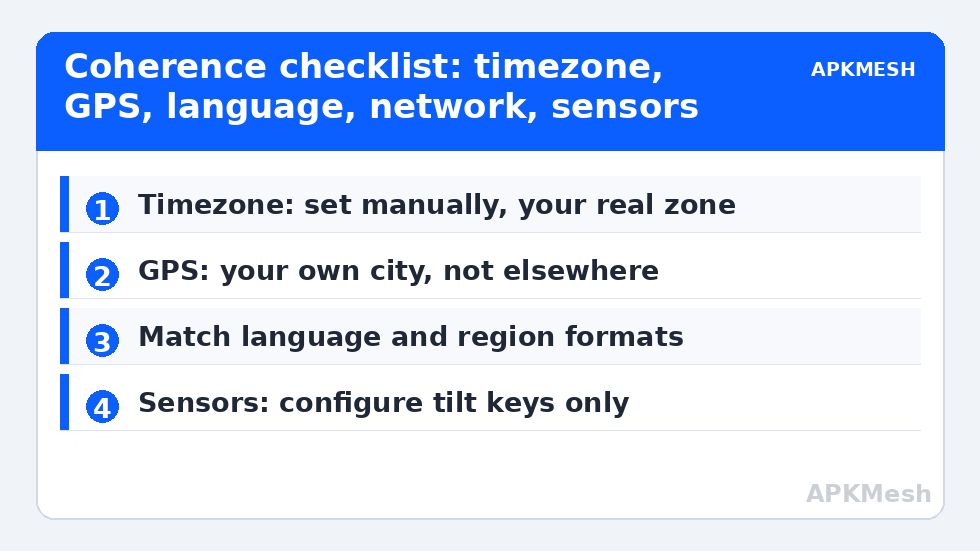
- Timezone set manually to your real zone; date and time automatic from the host.
- Virtual location placed in your own city; language and region formats matching.
- Windows host timezone and location agreeing with the guest’s claims.
- Sensor extras (tilt keys, shake) configured only if a game you play needs them.
- Nothing in the stack claiming a place or time you could not defend as your own setup.
Run that checklist at instance creation — beside allocation, renderer, and profile — and an entire category of weird, intermittent app behaviour never gets a chance to start. Keep the resulting values in your per-instance notes with everything else documented across APKMesh, because the day an app misbehaves regionally, your first diagnostic question will be which witness changed: GPS, clock, network, or identity.
Privacy: The Other Reason to Set Location Deliberately
There is a quieter motive for configuring these screens even when nothing appears broken: many free apps request location permission for advertising and analytics rather than for any feature you use. An emulator instance gives you a clean way to answer honestly but coarsely — a city-level virtual location, granted only to apps whose features genuinely need a place, and denied to the rest — instead of the all-or-nothing choice a phone imposes while it sits in your pocket. Review the permission list seasonally inside Android settings, revoke location from anything that never visibly used it, and remember that an app denied location gracefully is behaving correctly, not malfunctioning. Privacy, like performance, turns out to be mostly a settings habit rather than a product you install.
A Note for Developers and Testers Reading Along
Everything in this guide doubles as testing advice: the coherence checklist is precisely how you construct believable test devices, and the contradiction catalogue is a list of the edge cases location-aware apps fail in the wild. Deliberately vary one witness at a time — timezone without location, location without language — and watch how your app degrades. The emulator’s ability to hold a perfectly consistent false neighbourhood, or a perfectly inconsistent one, is a feature physical phones cannot offer a test bench at any sane price.
Frequently Asked Questions
Why do my game rewards reset at the wrong time in the emulator?
The instance timezone is the usual culprit – a cloned or restored instance can carry a stale zone, so the guest clock disagrees with the game’s expectations. Set the timezone manually to your real zone inside Android settings rather than relying on automatic detection, then restart the instance and check the in-game timers.
How do I set my location inside an Android emulator?
Use the emulator’s location tool, usually a map picker in its toolbar or settings, and place the point in your own city. That gives weather, local search, and region-sensitive apps a coherent answer. Keep the timezone and language settings consistent with the same place for the most reliable behaviour.
Can I play location-based games with virtual GPS?
Not safely or legitimately. Faking movement in games built around physical travel violates their terms, is detected through GPS, network, and sensor contradictions, and leads to bans. Virtual location’s respectable uses are coherence for ordinary apps, privacy, and development testing – not spoofing games designed around walking.
Why does my fitness app not count steps in the emulator?
Emulators synthesise sensor data and typically provide no genuine step counter or continuous motion stream, so fitness apps undercount, show perfectly still readings, or refuse the environment entirely. Fitness tracking is a phone-and-wrist workload; no emulator sensor setting manufactures real movement data.
Do sensor settings affect normal games?
Rarely. Most games read sensors lazily or not at all. The exceptions are tilt-controlled titles, which need the emulator’s tilt keys or a phone-as-controller feature configured, and augmented-reality games, whose combined camera, gyroscope, and location requirements an emulator cannot honestly satisfy.