There is a particular kind of emulator user — the reroller, the multi-account farmer, the guild manager with four alts — for whom one instance is never the point. Their problem is choreography: getting several Android copies to install the same game, accept the same taps, and stay within a low-end PC’s budget while doing it. That is exactly what emulator instance sync settings and disciplined cloning are for. This guide covers building a clean master, cloning it correctly, running the operations synchronizer without melting an 8GB laptop, and knowing where the technique’s honest limits sit.
Master First: The Instance Everything Copies
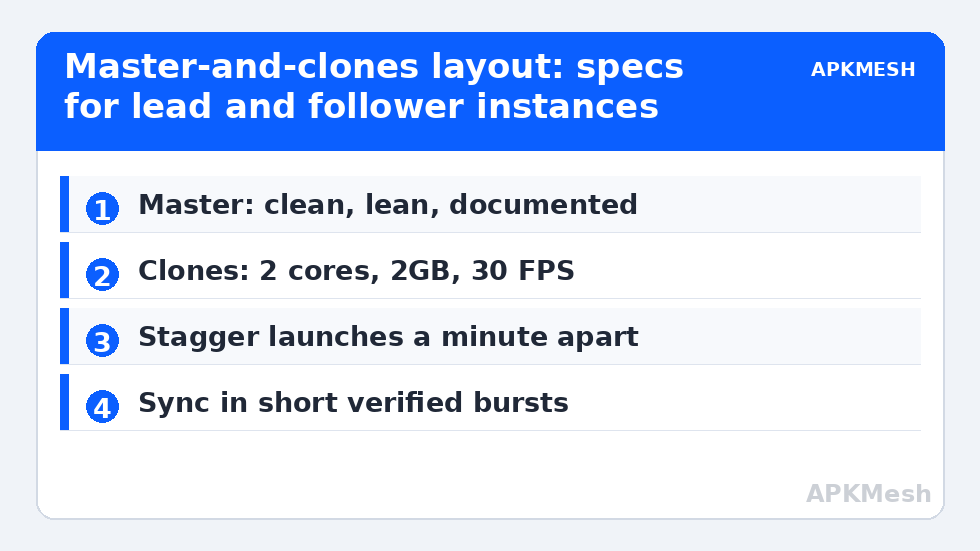
Every sync workflow stands or falls on the master instance, so build it like you mean it. Create a fresh Pie 64-bit or Android 11 instance, allocate it modestly (it will be cloned, not played hard), install the target game, sign in, finish the tutorial, apply your tuned display and control profile, and then stop. A master polluted with half-finished experiments produces clones that inherit every mistake at scale. Note the master’s exact settings in writing; when a clone misbehaves, the master is your reference implementation.
Keep the master lean in storage terms too. Every gigabyte in the master’s virtual disk is multiplied by the number of clones, so uninstall bundled extras, clear download folders, and let the game’s own data be the only real weight. On a small SSD, disk multiplication — not RAM — is often the first wall a sync setup hits.
Cloning Without Multiplying Your Mistakes
| Step | Practice | Why it matters |
|---|---|---|
| Clone type | Full clone for independence; linked clones only if your emulator supports them safely | Independent disks survive a master cleanup; linked ones may not |
| Naming | Purpose plus number: Farm-01, Farm-02 | Sync panels list instances by name; chaos starts with Instance(3) |
| Accounts | Sign each clone into its own game account after cloning | Clones inherit the master’s sign-in, which most games treat as one session |
| Specs | Lower clones to 2 cores / 2GB / 30 FPS after cloning | Cloned masters carry master specs; four gaming profiles is a crash budget |
| Stagger | Launch clones one at a time, a minute apart | Simultaneous boots storm the disk and CPU together |
The spec row deserves stress. Cloning copies configuration as faithfully as it copies apps, so a master tuned for solo play hands every clone a solo-play appetite. Retune each clone down immediately after creation, using the budgeting arithmetic in running multiple emulator instances without crashing — half your threads reserved for Windows, background instances capped, total RAM allocations held comfortably below physical memory.
Lag risk: —
The Operations Synchronizer, Used Honestly
BlueStacks calls it the Operations Synchronizer, LDPlayer offers operation recording and synchronisation in its own vocabulary, and the idea is identical: perform an action once in the main instance and replay it, taps and keystrokes alike, across selected clones. For genuinely repetitive work — daily claims, identical menu routes, synchronized reroll attempts — it converts four chores into one. Used well, it is the difference between farming as a background rhythm and farming as a second job.
Used badly, it desynchronises. Instances drift: one loads slower, one shows a pop-up the others did not, one game’s random dialogue box swallows the tap meant for a button. The professional habit is to sync in short bursts between known-identical screens (everyone at the home menu, everyone past loading), verify visually after each burst, and never let a long unattended sync chain run across content that branches randomly. Sync amplifies whatever state the instances are in, including the wrong one.
The Budget for a Sync Setup on 8GB and 16GB
On an 8GB, four-thread laptop, the realistic sync layout is one lead instance you actually watch plus two throttled clones — three total — with Eco-style caps on the followers and the lead at a modest 60. On 16GB with eight threads, four instances become comfortable and five are possible for light titles. In both cases the followers want the portrait-instance treatment from portrait and vertical mode setups when the farmed game allows it: small windows, low caps, minimal appetite. Resolution is negotiable for followers in a way it never is for the instance you play; 960×540 followers are a legitimate economy, because you are reading their state, not aiming with it.
Thermal reality closes the argument. Four instances at full tilt share one cooling system, and the setup that benchmarks beautifully for three minutes throttles in minute twenty. Build sync layouts for the steady state: caps set so that after half an hour, clocks — and therefore sync timing — are the same as at the start. A synchronizer fed by drifting instances produces exactly the missed taps and half-applied routes that give the technique a bad name.
Rules, Accounts and Fair Play
A word that belongs in every sync guide: multi-account play and input synchronisation sit differently in different games’ terms of service. Some titles tolerate alts but forbid synchronized input; others permit both; a few ban emulator multi-boxing outright. The settings in this article are neutral technology — the responsibility for checking your game’s current rules is yours, and a banned main account is a far higher price than any farming efficiency. Keep each clone on its own account, avoid synchronized play in competitive ranked modes entirely, and treat any game whose anti-cheat begins objecting as a stop sign rather than a puzzle. The rest of your setup notes live alongside the other multi-instance guides on APKMesh.
Protecting the Setup: Backups and Breakage
A four-instance farm represents hours of accumulated accounts, progress, and tuning, and it deserves the same backup respect as a main instance. Export or copy the master and at least your lead clone before emulator updates, big game patches, or any experiment with rooted or modified tooling in the same environment; the habits in backing up and restoring emulator game data scale from one instance to a fleet with only the filenames changed. Label backups with dates and instance names, because a folder of undated virtual disks is archaeology, not insurance.
When something breaks mid-farm — one clone desyncs permanently, an instance refuses to boot — resist repairing the fleet in place. Diagnose against the master, and if the clone’s state is corrupt, delete and re-clone from the master rather than nursing a divergent copy whose settings no longer match your documentation. The entire value of the master-and-clones architecture is that any single member is disposable; the moment you start hand-repairing clones, you have quietly returned to maintaining four separate computers.
When Sync Is the Wrong Tool Entirely
End with the counter-advice, because recognising it saves the most time: if your titles are story-driven, reactive, or heavy with random events, synchronisation buys nothing and costs constant vigilance — play those games in one instance like everyone else. Sync earns its complexity only where the work is genuinely identical across accounts: fixed daily routes, simultaneous rerolls, coordinated claims. The players who love this feature are the ones whose games contain real repetition; the players who hate it are usually trying to synchronise content that was never the same twice, and no settings page can reconcile that mismatch.
Frequently Asked Questions
What does the operations synchronizer actually do?
It records or mirrors your taps and key presses in a main instance and replays them simultaneously in selected cloned instances, so identical menu routes and repetitive tasks are performed once instead of four times. It works best in short bursts between screens you have verified are identical on every instance.
How many synced instances can an 8GB laptop handle?
Realistically three: one lead instance you watch and two throttled followers at 2 cores, 2GB and low frame caps. A 16GB machine with eight threads comfortably handles four. The limit is the combined thread, RAM, GPU, and disk budget, not the synchronizer itself.
Why do my clones fall out of sync after a few minutes?
Drift: one instance loads slower, shows an extra pop-up, or hits a random dialogue the others did not, and every replayed tap after that lands slightly wrong. Sync in short bursts, return all instances to a known identical screen between bursts, and verify visually before continuing.
Should clones keep the master’s settings?
Keep its game installation, account setup pattern, and control scheme – but retune resources down immediately. Clones inherit the master’s specs, and several solo-play profiles running at once exceed a low-end PC’s budget. Followers need smaller allocations and frame caps than the lead.
Is multi-instance syncing allowed in games?
It depends entirely on the game’s terms of service. Some titles allow alt accounts but forbid synchronized input, others allow both, and some prohibit emulator multi-boxing altogether. Check your game’s current rules first; a banned account costs far more than farming efficiency saves.