
Renderer choice is the most misunderstood emulator setting because the “best” answer changes with your GPU vendor, the game’s engine, and even the specific title update. Understanding opengl vulkan directx emulator performance starts with one fact: the renderer is the translation layer between Android’s graphics calls (which assume a mobile GPU) and your PC’s graphics stack. A good translation is invisible; a bad one costs 20–40% of your frame rate or produces the black textures and flickering models users blame on the emulator itself.
What Each Renderer Actually Does
| Renderer | How it works | Typical strength | Typical weakness |
|---|---|---|---|
| OpenGL (ES → desktop GL) | The classic path; Android’s native API translated to desktop OpenGL | Broadest game compatibility; mature on Intel iGPUs | Higher CPU overhead per draw call |
| DirectX (11) | Translates through ANGLE-style layers to Microsoft’s API | Often best on older AMD/Intel Windows drivers | Some shader effects translate imperfectly → visual glitches |
| Vulkan | Low-overhead API; emulator maps Vulkan-capable mobile calls more directly | Lowest CPU overhead; best for busy 3D scenes on modern GPUs | Per-game quirks; shader compilation hitches on first play |
Android games are written against OpenGL ES or Vulkan. When you pick “DirectX” in an emulator, an extra translation step exists under the hood. That does not make it bad — Microsoft’s driver stack on Windows is heavily optimized, and on some Intel and AMD integrated graphics the DirectX path is measurably smoother. It does mean DirectX results are the most variable between machines.
OpenGL Vulkan DirectX Emulator Performance: The Decision Procedure
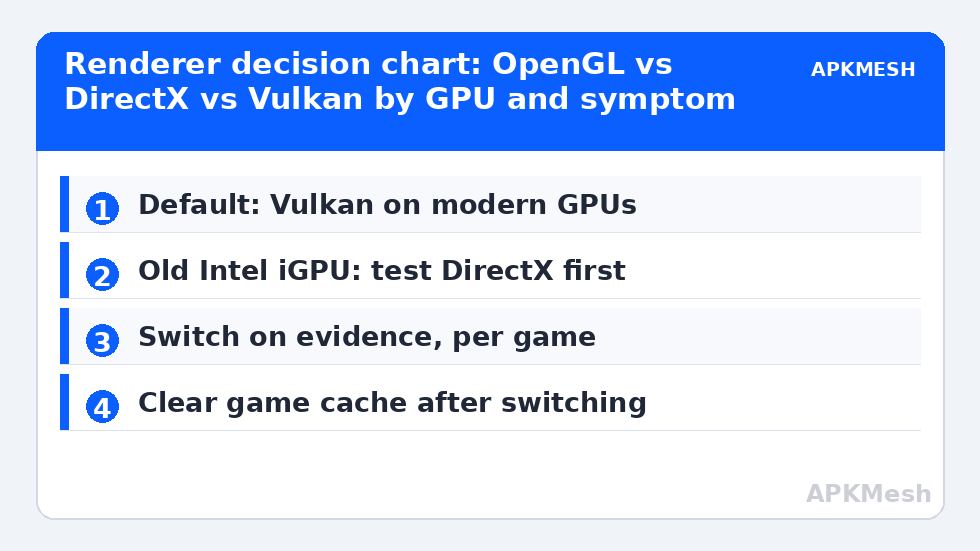
- Default: Vulkan if your GPU and emulator both support it (most discrete GPUs and Iris Xe / RDNA iGPUs from the last several years), otherwise OpenGL.
- Play 15 minutes. Judge frame-time stability, not just the FPS counter — and expect first-session shader stutter on Vulkan that fades as caches build.
- Switch on evidence only: repeatable artifacts (missing textures, wrong colors, crashes at the same point) or clearly worse lows → try the next renderer for that game.
- After switching, clear the game’s cache (Android Settings > Apps > Storage > Clear cache) so stale shaders compiled for the old path are rebuilt.
- Record the winner per game; emulators like LDPlayer and BlueStacks let you keep different settings per instance, not per game, so group games by renderer across instances if you play several demanding titles.
Lag risk: —
Why Vulkan Wins Busy Scenes
Draw calls are the unit of graphics work: every distinct object batch costs the CPU a submission. OpenGL’s stateful design makes each submission relatively expensive; Vulkan was designed to prepare work in parallel and submit it cheaply. In a quiet training map both APIs hit the frame cap and look identical. In a final-circle firefight with 40 characters, vehicles and effects, the CPU submission cost dominates — and Vulkan’s advantage appears as higher minimum FPS rather than a higher peak. This is also why renderer tests done in menus mislead. Benchmark in the busiest repeatable scene you have.
Integrated Graphics: The Special Case
On Intel UHD 620/630 and similar, driver quality decides more than API theory. Intel’s Windows OpenGL driver has historically been the weakest of its three paths, so DirectX frequently feels better on exactly the hardware where theory says OpenGL should be native. On Iris Xe (11th-gen onward), the Vulkan driver is solid and usually the right pick. AMD’s Vega and RDNA integrated graphics handle all three competently, with Vulkan ahead in heavy titles. Dedicated NVIDIA and AMD cards: Vulkan first, OpenGL as the compatibility fallback, DirectX rarely needed. Our Intel UHD graphics settings guide applies this per-chip, and the MuMu Player 12 high FPS setup shows a Vulkan-first configuration end to end.
Settings That Interact With the Renderer
- ASTC texture decoding: hardware decoding pairs with modern renderer paths; on glitchy iGPU drivers choose software decoding regardless of renderer.
- Resolution: a renderer cannot rescue an over-high resolution on a weak GPU; drop pixels before blaming the API (see resolution and DPI settings for wide monitors).
- Shader caches: both Vulkan and DirectX paths compile shaders at runtime. A game that stutters only in its first match after an update is rebuilding caches — annoying, temporary, and not a settings failure.
- Anti-aliasing forced by the emulator: leave in-game AA to the game; double AA (emulator + game) wastes fill rate on every path.
Treat the renderer as a per-game compatibility tool with a sensible default, not a performance religion. More emulator tuning lives in Emulator Settings.
Shader Compilation: The Stutter That Is Not Your Fault
Every renderer path compiles the game’s shaders into GPU-specific binaries the first time they are encountered, then caches them — in the emulator’s cache, the game’s cache, or the Windows DirectX shader cache depending on path. This produces a signature pattern: a new map, a new character skin, or a post-update session stutters in brief, specific spots, then runs clean forever after. Users misdiagnose this as thermal throttling or “the emulator getting worse”, reinstall everything, and — by wiping the caches — sentence themselves to recompiling it all. The patient protocol: after choosing a renderer, play each regular game for one full session before judging it, and never clear shader caches as a routine “cleanup”. Cache clearing is a diagnostic for corruption (artifacts, crashes at fixed points), not a maintenance ritual.
A Note on ANGLE and Why Emulator “DirectX” Keeps Improving
The translation layers under emulator DirectX modes descend from Google’s ANGLE project, which also powers Chrome’s WebGL on Windows. ANGLE is actively developed and its Vulkan backend has matured rapidly; recent emulator builds quietly route “DirectX” selections through newer translation stacks. The practical meaning: renderer advice has a shelf life. A title that needed OpenGL in a 2023 build may run best on the default path in a 2026 build of the same emulator, which is one more reason to re-run the 15-minute per-game test after major emulator updates rather than treating a render choice as permanent scripture.
What to Do When All Three Renderers Misbehave
Occasionally a title glitches on every path — artifacts in OpenGL, crashes in Vulkan, stutter in DirectX. Work the wider fault tree before concluding the game is broken: update the emulator (renderer stacks are its most-patched component), update the GPU driver, and test the game on a fresh instance to eliminate accumulated cache corruption as the variable. Check the game’s community for its current known-good configuration; emulator gaming is a large enough world that your exact title-plus-GPU combination has usually been mapped by someone. If the fault appeared immediately after a game update, the probable author is the game, and the correct fix is patience plus a report to its developers — renderer roulette cannot patch a broken shader the game itself ships.
Frequently Asked Questions
Which renderer gives the highest FPS in emulators?
On modern GPUs, Vulkan usually delivers the best frame-time stability in busy 3D scenes because of its lower CPU overhead. In light games all three renderers hit the same FPS cap, and on older Intel integrated graphics DirectX can beat both — test per game.
Why does Vulkan stutter the first time I play a map?
Vulkan compiles shaders on first encounter and caches them. The first session on a new map or after a game update stutters while those compile; subsequent sessions reuse the cache and run smoothly. It is expected behavior, not a broken setting.
Is DirectX in emulators really DirectX?
Effectively it is a translation layer: Android’s OpenGL ES calls are converted to DirectX 11 by components similar to ANGLE. It works well on Windows, especially with weaker OpenGL drivers, but adds a conversion step that occasionally mistranslates effects.
Should I change the renderer to fix black textures?
Yes — black or missing textures are a classic renderer-mismatch symptom. Switch the renderer for that game, clear the game’s cache, and restart the emulator completely before retesting.
Does the renderer affect battery or heat on laptops?
Indirectly. A lower-overhead path (usually Vulkan) lets the CPU run slightly cooler at the same FPS, which can delay thermal throttling in long sessions. The effect is real but second-order compared with resolution and FPS caps.