
Not every racing fan owns a wheel, and many Android racers were designed for tilt or a thumb slider rather than for pedals and a rim. Between the keyboard’s all-or-nothing steering and a wheel you do not have sits an underused middle option: the mouse. Good mouse steering racing games emulator technique turns horizontal mouse position into steering angle, giving you the gradual turn-in, mid-corner correction and gentle straight-line trimming that arrow keys can never produce. It will not match a wheel for immersion, but for precision per pound spent, it is remarkably hard to beat.
This guide covers the two main ways emulators express mouse steering: a steering control whose angle follows the pointer’s position relative to a centre point, and mouse-look style schemes adapted from camera controls. It explains how to set the steering range so a comfortable desk movement equals full lock, how to handle throttle and brake when your right hand is steering, and which genres of mobile racer suit the mouse (circuit and rally titles with analogue steering models) versus which do not (games whose only steering is a left/right button pair dressed up as a slider).
Set the Steering Range Before Anything Else
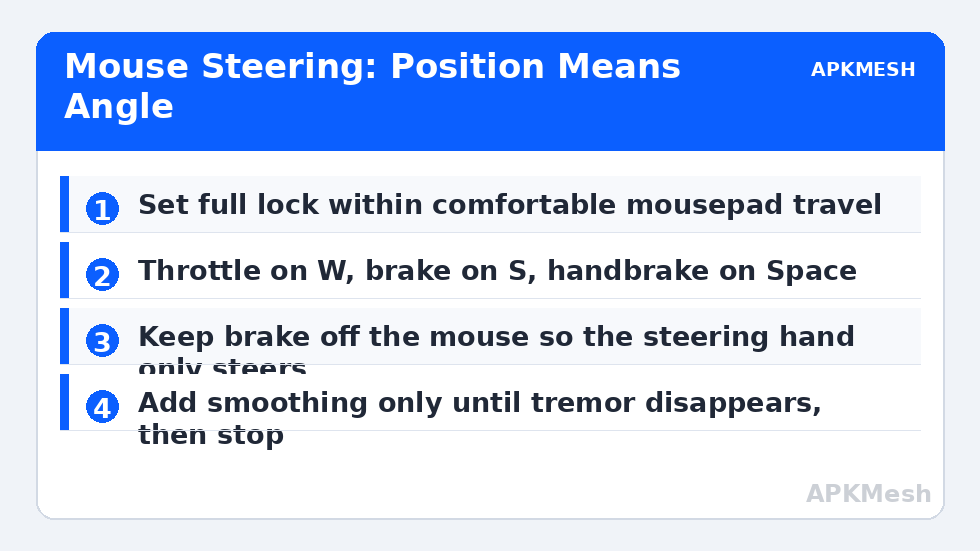
Mouse steering lives or dies on range. Place the steering control over the game’s virtual steering slider, stick or tilt zone, then decide how much physical mouse travel should represent full left-to-full-right lock. A useful starting band for many players is a range you can cover without lifting the mouse or twisting your wrist, often roughly the middle portion of your mousepad. Too narrow and the car darts at every tremor; too wide and hairpins require a second swipe, which arrives as a sudden second dose of steering mid-corner. Test range on a long, gentle bend first, not a hairpin: the correct range is the one where holding a smooth arc feels boring.
Centre behaviour needs equal care. Some implementations return steering to centre when the mouse stops moving; others hold the angle implied by the pointer’s position. Position-based steering is usually more predictable for racing, because the car’s angle matches a visible pointer position you can learn spatially. Whichever your emulator offers, spend your first session in a practice or time-trial mode building the association between desk position and lock, the same way wheel users learn degrees of rotation. A strip of tape at your pad’s centre is a legitimate training aid for the first week.
| Input | Assignment | Hand | Notes |
|---|---|---|---|
| Steering | Mouse horizontal position | Right | Range set to comfortable pad travel |
| Throttle | W (hold) or mouse forward button | Left or right | Must be sustainable for whole straights |
| Brake / reverse | S (hold) | Left | Keep adjacent to throttle for quick swaps |
| Handbrake | Space | Left thumb | Large target for rally-style turns |
| Nitro / boost | Shift or right mouse button | Either | Used on exits; must not disturb steering hand if possible |
| Camera / look back | C or middle mouse button | Either | Occasional use, keep off the steering path |
Throttle, Brake and the Two-Hand Split
With the right hand steering, the left hand becomes the pedals. W and S for throttle and brake feel natural to anyone who has played a keyboard racer, and their adjacency makes the throttle-to-brake swap a one-finger slide. Digital throttle is the honest weakness of this layout: a key is fully on or fully off, while real corners reward partial throttle. Compensate with technique rather than settings. Short, deliberate taps feather the throttle on corner exit, and choosing a slightly earlier brake point avoids the all-or-nothing lunge that digital braking encourages. Games with traction or stability assists forgive this; hardcore simulation-leaning titles will expose it, and those are the titles where a second-hand wheel is eventually worth buying.
If your mouse has extra buttons, moving boost to a side button keeps the left hand purely on pedals and Space. Avoid putting brake on a mouse button: braking must be available at the exact moment steering is busiest, and a steering hand that must also squeeze a precise button at the apex tends to add steering input while doing so. The division of labour — right hand only steers, left hand only manages speed — is the layout’s real strength, so protect it when you are tempted to add clever exceptions.
Lag risk: —
Steering Sensitivity, Smoothing and Speed
Many steering controls expose a sensitivity or smoothing value that filters how quickly the virtual steering follows the pointer. A little smoothing hides hand tremor on straights and makes the car feel planted; too much creates the classic complaint that the car turns after you ask it to, which players misdiagnose as input lag. Tune it on a slalom of gentle direction changes: increase smoothing until visible tremor disappears, then stop, and re-check that a deliberate quick lane change still happens in one movement. Revisit the setting per speed class if the game allows separate schemes, because a range and smoothing that feel perfect in a slow hatchback can feel nervous in a hypercar whose steering model is already quick.
Straight-line stability also depends on your Windows pointer settings. Acceleration in pointer movement translates into steering that changes with mouse speed rather than position, which is why the usual emulator advice to disable pointer acceleration matters doubly here. Position must mean angle, every time, at any speed of hand movement, or no amount of practice will make hairpins consistent.
Practice Drills and Honest Comparisons
Learn mouse steering with three drills. First, constant-radius circles in an open area, holding one arc for a full minute per direction, to teach your hand the centre and quarter-lock positions. Second, a gentle slalom at moderate speed, concentrating on returning exactly to centre between turns rather than on speed. Third, braking into one repeated corner, where the left hand’s timing and the right hand’s turn-in must synchronise. Ten minutes of drills per session for a week produces a steadiness that free racing alone rarely does, because races hide steering errors inside traffic and drama.
Compared with tilt emulation through the same mouse, position-based steering is usually easier to hold on a long bend because your hand rests at a place rather than maintaining a lean. Compared with keys, it is not close: the first time you trim two degrees of angle to avoid a wall instead of choosing between zero and full lock, the case makes itself. Keep keys bound alongside the mouse scheme for menus and for games whose steering model turns out to be digital in disguise; discovering that in the editor, rather than on the grid, is what practice modes are for.
Related Keymapping Guides
Return to the APKMesh homepage for the complete emulator collection; the closest companions are:
- racing wheel and pedal setup for the upgrade path when mouse steering convinces you the genre is worth hardware
- free look controls in battle royale games for another scheme built around disciplined mouse behaviour
- emulating tilt and gyro controls the main alternative for the same tilt-born racers
Frequently Asked Questions
Is mouse steering really better than arrow keys for racing games?
For any game with an analogue steering model, yes, clearly. Keys offer only centre or full lock, so every corner is negotiated in pulses. Mouse position gives you every angle in between, which means smoother turn-in, mid-corner correction and gentle trimming on straights. For games whose steering is secretly digital, keys are equally good and simpler.
How much mousepad should full steering lock use?
Start with a range you can cover in the comfortable middle of your pad without lifting the mouse or twisting your wrist, then tune on a long gentle bend. Too narrow makes the car nervous; too wide forces a second swipe in hairpins, which dumps extra steering mid-corner. The correct range makes holding a smooth arc feel unremarkable.
Where should throttle and brake go when the mouse steers?
On the left hand, usually W and S, so the steering hand does nothing but steer. Their adjacency makes throttle-to-brake swaps a small slide. Keep brake off the mouse entirely: squeezing a button with the steering hand at the apex tends to add unwanted steering input at the worst moment.
Why does my car turn a moment after I move the mouse?
Steering smoothing is probably set too high, filtering your input into a delayed response. Reduce it in steps on a gentle slalom until deliberate lane changes happen in one movement, while keeping just enough smoothing to hide hand tremor on straights. Also confirm Windows pointer acceleration is off, since it distorts position-based steering badly.
Can mouse steering handle drift and rally games?
Reasonably well, because counter-steering is a position the mouse can find and hold quickly, and the handbrake sits naturally on Space under the left thumb. The limiting factor is digital throttle on corner exits, managed with deliberate taps. Rally titles with very sensitive steering models may need a wider range and more smoothing than circuit racers.