To fix alt-tab glitch behaviour in an Android emulator, you need to know what the emulator was holding when Windows took focus away. At the moment you alt-tab, the emulator may be capturing your mouse for shooting mode, tracking several held keys (sprint plus movement), rendering through a fullscreen path, and playing audio — and focus loss interrupts all four mid-sentence. The glitches players report map neatly onto those four systems: the camera spins or the mouse escapes (capture), your character keeps running or a modifier stays ‘pressed’ (key state), the window returns black or frozen (renderer), and game audio keeps blaring or vanishes (audio routing). Each has a fix, and most players only need the first two. This guide works through them in order of frequency, with the return-to-game routine that clears 90% of incidents in five seconds.
Set expectations correctly: an emulator is a guest system translating input for a phone OS that has no concept of alt-tab. Some roughness at the seam is structural; the goal is a seam you can cross fifty times a session without thinking, not a theoretical perfection no Android layer can offer.
The Five-Second Return Routine (Fixes Most Incidents)
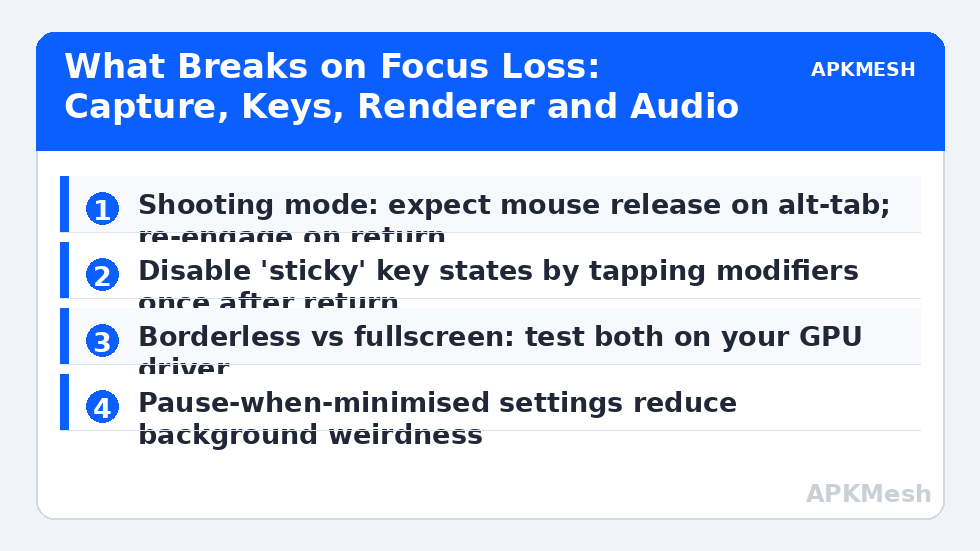
When you return to a misbehaving emulator, do this before diagnosing anything: click once inside the game window (restores focus properly rather than relying on the alt-tab highlight), release every key and tap Shift, Ctrl and Alt once each (clears stuck modifier states that Windows and the emulator disagreed about during the switch), then re-engage your mouse mode deliberately — in a shooter, toggle shooting mode off and on, or click to recapture as the game’s prompt suggests. Stuck movement is cleared by tapping the opposite direction key once. This routine works because most alt-tab glitches are state mismatches, not damage: the emulator missed a key-up event while unfocused and still believes you are holding W. The taps re-teach it reality.
If your character performed actions while you were away (fired, moved, opened menus), the emulator was receiving input meant for the other window or replaying held state. Check whether your other app and the emulator share bindings (a media key, a macro pad output) and, more importantly, adopt the pause discipline from the next section so the game is never live and listening while you are elsewhere.
Lag risk: —
Prevention: Pause, Focus and Capture Settings
Most emulators and most games offer a piece of the puzzle. In the emulator settings, look for options to pause or reduce activity when the window is minimised or unfocused, and enable them for session games; in the game, use its pause or a safe area before switching — obvious advice that the five-second routine exists because nobody follows mid-match. For mouse capture, know your scheme’s behaviour: shooting-mode schemes release the cursor on focus loss by design, so the ‘glitch’ of an escaped mouse is actually correct operation; the fix is expectation plus a fast re-engage habit (the toggle key from our smart-controls layout should be thumb-close for exactly this moment).
Boss-key and window modes are the structural choices. Borderless windowed mode alt-tabs fastest and most reliably on modern Windows because no display mode change occurs; exclusive fullscreen can still win a little latency on some systems (our input-lag guide weighs that trade) at the cost of slower, glitch-prone switches and the occasional black-return that only a mode toggle fixes. If you alt-tab constantly — streamers, traders of in-game goods, anyone with a second monitor of chat — borderless is the professional choice and fullscreen is a sometimes treat.
| Glitch on return | System at fault | Immediate fix | Durable fix |
|---|---|---|---|
| Character keeps moving/firing | Key state (missed key-up) | Tap opposite key; tap modifiers once | Pause before switching; borderless mode |
| Camera spins / mouse escaped | Mouse capture released | Click in window; re-engage shooting mode | Keep toggle key thumb-close |
| Black or frozen frame | Renderer / fullscreen path | Toggle fullscreen off/on; resize window once | Prefer borderless; update GPU driver |
| Game audio continues while away | Audio routing | Mute emulator from sidebar | Set emulator volume behaviour on focus loss |
| Other app received your inputs | Focus ambiguity | Click emulator window before typing | Use per-app schemes and clear focus habits |
| Frame rate halved after return | GPU power state | Toggle emulator performance mode | Windows graphics setting: emulator = High performance |
The Renderer Class: Black Screens and Frozen Frames
When the return shows a black window while audio plays on, the Android UI is alive and the emulator’s rendering surface failed to reattach after the focus/mode change. Sequence of escalating fixes: click the window and wait two seconds (surface re-creation is not instant); toggle the emulator’s fullscreen state; resize the window by a few pixels, which forces a surface rebuild on most builds; switch the emulator’s graphics renderer (OpenGL ↔ DirectX/Vulkan in engine settings) as a semi-permanent experiment if black returns are a pattern on your GPU; and update the GPU driver, because surface-loss bugs live in drivers more often than in emulators. If a specific game black-screens while others return cleanly, suspect the game’s own resume handling — some mobile titles handle Android’s pause/resume poorly when the ‘activity’ beneath them changes, and the practical fix is the game’s graphics setting one notch lower to reduce its re-initialisation cost.
Multi-instance users see a cousin of this: switching between instances is an alt-tab inside the emulator family, and an instance left rendering at full rate in the background starves the foreground one. Cap or pause background instances (both major emulators offer background FPS behaviour in settings) and the foreground instance’s return glitches mostly vanish with the contention.
Making Peace With the Seam
Adopt a switching style that respects the machinery: pause or safe-spot before switching in session games; use the second monitor for reference material so switching is a glance, not a focus change; keep chat and notes on the Windows side rather than in-emulator overlays. And when you return, run the five-second routine by reflex. Players who do these things stop describing alt-tab as a glitch source within a week — not because the seam vanished, but because their routine crosses it cleanly. If, after all of the above, one specific title still breaks on every return, record the pattern (game, renderer, mode) and treat it as that title’s known issue: play it in borderless, never minimise it, and let the other 95% of your library use the fast path.
Related Keymapping Guides
More from this category is collected in the Keymapping Guides archive. These companion guides go deeper on the topics touched above:
- delayed key response and lag chain
- unresponsive keys during multiplayer sessions
- JoyToKey focus behaviour in translated setups
Frequently Asked Questions
Why does my character keep running after I alt-tab back?
The emulator missed the key-release event while it was unfocused and still thinks the movement key is held. Tap the opposite direction key once to clear it, tap Shift/Ctrl/Alt once each to clear stuck modifiers, and pause the game before switching to prevent repeats.
The emulator window is black but I can hear the game. What do I do?
The render surface failed to reattach. Click the window and give it two seconds, toggle fullscreen, or resize the window slightly to force a surface rebuild. If it recurs on one GPU, switch the emulator’s renderer (OpenGL/DirectX/Vulkan) and update the GPU driver.
Is borderless or fullscreen better if I alt-tab a lot?
Borderless. It avoids display mode changes, so switches are faster and far less glitch-prone. Exclusive fullscreen can shave a little latency on some systems, but if you switch constantly, the reliability of borderless wins.
My mouse leaves the game every time I return. Is that a bug?
No — shooting-mode mouse capture is designed to release on focus loss so you can use your desktop. Click into the window and re-engage shooting mode with its toggle key; keep that toggle somewhere your thumb finds without looking.
Could background instances cause my main window’s glitches?
Yes. A second instance rendering at full rate starves the foreground one of CPU/GPU, and its return-from-focus behaviour degrades. Cap background-instance FPS or pause background instances in the emulator’s settings.