Switching shooters on an emulator often feels like relearning to aim from zero, even though your hand has not changed. The trick is to convert sensitivity between emulator games using a physical measurement instead of copying a slider number from one title into another. A value of 1.20 in LDPlayer for one game and 1.20 in BlueStacks for a second game rarely produce the same camera speed, because each game applies its own field of view, its own camera multiplier, and sometimes its own smoothing on top of the emulator value. If you anchor everything to centimetres per 360-degree turn, your muscle memory can travel with you.
This guide shows a complete conversion workflow: measure your current game honestly, record the number that actually matters, translate it into the new game with a short aim-trainer routine, and then check scoped sensitivity separately. It also explains why yaw values and field of view change the maths, and why a converter website alone cannot finish the job inside an emulator. You will need a ruler or tape measure, a training range or empty custom lobby, and about twenty minutes of patience before your first real match in the new title.
Measure Your Source Game Before You Touch the New One
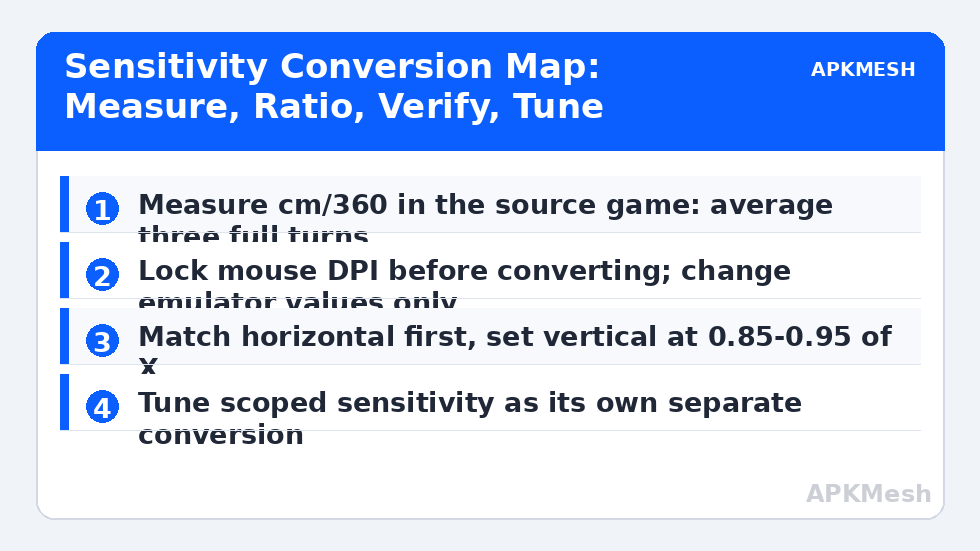
Open the shooter you already play well and enter its practice range. Mark the spot where your mouse starts with a small piece of tape on the desk, then turn your character exactly one full revolution and stop when the crosshair returns to the same landmark. Measure the distance your mouse travelled. That distance, usually somewhere in the typical range of about 25 to 50 centimetres for many players, is your cm/360 figure, and it is the only source number worth trusting. Repeat the turn three times in each direction and average the results, because a single excited flick can be several centimetres short of a calm turn.
Write down more than the headline figure. Record your mouse DPI, the emulator sensitivity on both axes, the in-game sensitivity if the title has its own slider, your field of view setting, and your emulator resolution. Sensitivity does not live in one place: DPI decides how many counts your mouse reports, the emulator translates those counts, and the game translates them again. If you later change any layer and your aim feels wrong, this notebook entry tells you which layer moved. Players who skip this step end up chasing ghosts, lowering a slider to compensate for a DPI button they pressed by accident while lifting the mouse.
The Conversion Workflow, Step by Step
In the new game, do not start from its default sensitivity and nudge blindly. Start from a deliberately neutral emulator value, enter the training area, and run the same tape-measure turn. Suppose your source game gives you a comfortable full turn in 34 centimetres, but the new game needs 51 centimetres for the same turn. Your camera is moving too slowly, so you need to raise sensitivity by roughly the ratio of those distances, in this illustration about one and a half times the starting value. Apply the change, remeasure, and repeat until the two distances match within about a centimetre. The specific numbers here are an example of the method, not a recommendation for your hand.
Change one axis at a time. Match the horizontal turn first, because cm/360 is a horizontal measurement, then set vertical sensitivity as a proportion of it. Many players keep vertical a little lower, often around 85 to 95 percent of horizontal, so recoil control requires a steady pull rather than a fight. If the new game exposes separate hip-fire and aim-down-sights values but no scoped multiplier, treat the scoped setting as its own mini-conversion: scope in, pick a distant post or sign, and test how far the mouse moves while tracking across a fixed angle.
Lag risk: —
| Measurement | Where to test it | What to record | Typical note |
|---|---|---|---|
| Hip-fire cm/360 | Practice range, flat open area | Mouse travel for one full turn | Average of three turns each way |
| Vertical ratio | Wall with marked height lines | Y value as a share of X value | Often 0.85 to 0.95 of X for recoil control |
| Scoped cm/180 | Scoped view at a distant landmark | Mouse travel for a half turn | Judge separately from hip fire |
| Tracking comfort | Moving bot or strafing target | Overshoot or undershoot pattern | Adjust in small 0.05 steps only |
| Flick landing | Two targets at a known angle | Short, mid or long landings | Ten flicks before judging a change |
Using an Aim Trainer Without Fooling Yourself
An aim trainer inside the training range works best as a measuring instrument, not as entertainment. Build a short routine with three drills and fixed rules. First, wide flicks between two distant targets for two minutes, counting only clean landings where the crosshair stops on target without a correction. Second, smooth tracking of a moving target at medium range, noting whether you fall behind or drift ahead. Third, micro-corrections around a small target, which reveal whether your sensitivity is so high that tiny hand movements become large camera jumps. Run the routine in the old game if you can, then in the new game, so the scores are comparable.
Resist the urge to tune after every bad drill. Sensitivity changes need a settling period: give a candidate value at least one full routine and a short break before deciding. Also keep your posture, mouse grip, and mousepad position the same during testing as during real play. Testing while leaning forward at the edge of the desk produces a conversion that only works while leaning forward at the edge of the desk. It sounds obvious, yet it explains many conversions that felt perfect on Tuesday and broken on Wednesday.
Why Field of View and Yaw Break Simple Converters
Two games can share the same cm/360 and still feel different because field of view changes how fast the world appears to move at the edges of the screen. A wider view compresses more world into the same display, so targets cross the centre more slowly in visual terms even when the camera rotates at the same physical rate. Some engines also apply a different yaw multiplier to horizontal and vertical input, and some mobile shooters add acceleration or smoothing that no slider fully disables. Online sensitivity converters can help with a first estimate between well-known PC titles, but they rarely know the emulator layer or the mobile game’s own camera code, so treat their output as a starting point for measurement, not as a finished answer.
Practical rule: match cm/360 first, then spend one session judging only whether targets feel like they arrive too early or too late at the centre of the screen. If rotation distance matches but the game still feels fast, the cause is usually visual speed from field of view, and the honest fix is to match the field of view setting between games where the titles allow it, rather than destroying your measured conversion.
Related Keymapping Guides
Start from the APKMesh homepage for the full emulator setup library, then go deeper with these companion guides:
- fixing mouse sensitivity and acceleration problems when your measurement will not stay stable
- smart controls keymapping for LDPlayer shooters to rebuild the profile your converted values live in
- calibrating controller dead zones and stick drift if you split your play between mouse and pad
Frequently Asked Questions
Can I copy my sensitivity number directly from one emulator game to another?
No, not reliably. The number is only an input to each game’s own camera code, so identical values can produce very different turn speeds. Convert through a physical measurement instead: match centimetres per 360-degree turn in the training range, then fine-tune vertical and scoped values separately in small steps.
How long should I give a converted sensitivity before changing it again?
Give it at least one full aim routine and ideally a couple of low-stakes matches. Your hand needs time to stop expecting the old game’s response. Change the value only if the same error, such as consistent overshoot on medium flicks, appears across the whole session rather than in one bad fight.
Why does my aim match in hip fire but feel wrong when scoped?
Scoping narrows the field of view, so the same camera rotation sweeps more of what you can see, and many games apply a separate scoped multiplier. Treat scoped aim as its own conversion: measure tracking effort while scoped, then set the scoped value lower than hip fire until both states feel equally demanding.
Should I change DPI or emulator sensitivity when converting?
Keep DPI fixed and convert with the emulator and in-game values only. DPI is your anchor; if it changes, every measurement you recorded stops being comparable. Lock the DPI in your mouse software, disable any on-the-fly DPI button habit during testing, and note the value in your settings record.
Do sensitivity converter websites work for emulator games?
They can provide a rough first estimate, but they seldom account for the emulator translation layer or a mobile game’s extra smoothing and field of view defaults. Use a converter output as your starting value, then verify it with the tape-measure turn test in the actual game before trusting it in a match.