Running two or three emulator instances at once is routine for players who manage a main account and an alt, test a build on a fresh character, or keep a second game open beside the first. Controls are where multi-instance play quietly falls apart: the scheme you tuned belongs to whichever instance had focus last, an alt account inherits a layout built for a different class, and one careless edit rewrites the profile every window shares. Setting up per-instance control profiles emulator schemes deliberately, one named profile per instance and per role, turns a tangle into a system.
This guide covers how BlueStacks and LDPlayer multi-instance tools handle control schemes, how to name and organise profiles so the right scheme is active in the right window, and how keyboard focus actually behaves when several instances are visible. It also covers performance honesty: separate profiles solve confusion, not CPU limits, and a low-end PC running three instances needs its expectations set by its hardware, not by its keymapping. The goal is a desk where each window is predictable the moment you click into it.
How Instances Share and Separate Schemes
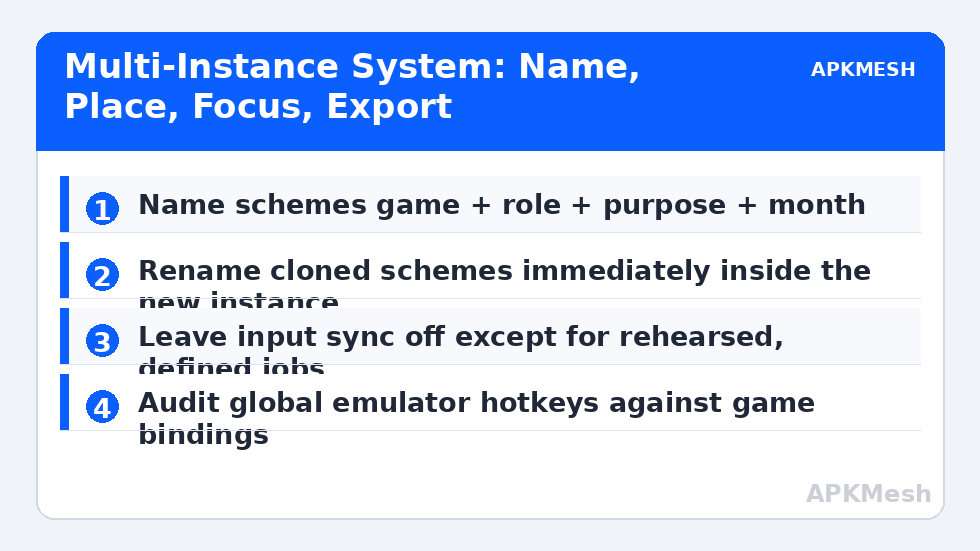
Emulator instances are separate virtual devices, but scheme storage is not always as separate as players assume. A scheme is typically tied to a game within an instance, so two instances of the same game can hold different schemes, yet sync or clone features may copy profiles when you duplicate an instance. That copy is convenient on day one and confusing on day thirty, because editing the clone’s scheme feels like editing the original. After cloning, immediately rename the scheme inside the new instance to include the instance or account role, so its identity is visible every time the editor opens.
Multi-instance managers also offer synchronisation features that replay your inputs across several instances at once. Sync is a powerful testing tool and a terrible everyday accident: players have deleted items or spent currency on an alt by performing an action on the main while sync quietly mirrored it. Treat sync as a mode you enter deliberately for a defined job, such as simultaneous daily logins you have rehearsed, and leave it off by default. Per-instance profiles and input sync solve different problems, and confusing them is how alts get hurt.
| Element | Shared or separate? | Recommended practice | Risk if ignored |
|---|---|---|---|
| Control scheme per game | Stored per instance, copied on clone | Rename immediately after cloning | Editing the wrong instance’s scheme |
| Keyboard focus | One window at a time | Click into the window, pause before playing | Inputs landing in the background instance |
| Input sync / synchroniser | Off by default, mirrors input when on | Use only for rehearsed, defined jobs | Mirrored purchases or deletions on alts |
| Resolution and DPI | Per instance | Match across instances of the same game | Same scheme’s zones landing differently |
| Exports | Files you control | Export each instance’s scheme with its role in the filename | Restoring the wrong profile confidently |
A Naming System That Survives Tired Evenings
Name schemes with four parts: game, instance role, layout purpose, and month. A name like Valley-Main-Raid-Oct tells you the game, that this is the main account’s instance, that the layout is the raid variant, and when it was last revised. Alt accounts get their own names rather than a copy suffix, because copy suffixes multiply into final, final2 and genuine confusion. Keep a tiny index note, in a text file or notebook, listing which instance runs which account role and which scheme each should show; thirty seconds of reading that note at the start of a session prevents the classic error of playing an alt with the main’s bindings and blaming your own hands.
Window arrangement is part of the control scheme too. Give each instance a fixed position and size on your monitor and keep it there, so spatial memory works: main on the left at full height, alt smaller on the right, testing instance minimised unless in use. Moving windows between sessions destroys that memory and also changes each window’s effective size, which can shift your sense of where zones sit even when the underlying percentages are unchanged.
Lag risk: —
Focus, Hotkeys and Cross-Instance Accidents
Only the focused window receives your keyboard, and the boundary between focused and unfocused is where multi-instance accidents live. Build a click-and-breathe habit: click into a window, see its border or title confirm focus, then play. Emulator-wide hotkeys deserve special care, because shortcuts for screenshots, boss keys, or instance switching may act globally while game keys act per window. Audit the emulator’s global shortcut list once, disable the ones you do not use, and never bind a global shortcut to a key your game schemes rely on, or you will eventually minimise an instance in the middle of a boss fight by pressing your ultimate.
Voice chat and push-to-talk add one more layer: the chat application has its own idea of the active window and its own key. Put push-to-talk on a key no instance uses, and test it while an instance is focused, because a talk key that the game also treats as an ability produces the twin embarrassments of broadcasting your keystrokes and firing a skill every time you speak.
Performance Expectations and Instance Roles
Separate profiles cannot create CPU cores. On a low-end PC, decide each instance’s role in performance terms as well as control terms: the main instance gets the higher frame rate target and the detailed scheme for active play, while background instances run at reduced frame rates with simple schemes used for harvesting, trading or daily tasks during short focused visits. Many multi-instance tools allow per-instance frame rate and resource limits; set them deliberately rather than letting three windows fight for the same cores. A background instance that stutters through its chores is not a keymapping failure and should not be troubleshot as one.
When you retire an alt or a testing instance, export its scheme before deleting it if there is any chance its layout taught you something. Storage is cheap, and the exported file plus your naming system means a returning account six months later can be restored to a familiar layout in minutes instead of rebuilt from screenshots and memory.
Once the system is running, protect it with a simple start-of-session ritual: glance at each window’s title or account portrait, confirm the scheme name in the instance you are about to play, and only then start queueing or spending. The ritual takes under a minute, and it is deliberately boring. Multi-instance errors rarely come from ignorance; they come from haste on a familiar desk, where everything looks right until an alt account performs the main account’s plan with the wrong bindings and the wrong inventory.
Related Keymapping Guides
Start from the APKMesh homepage to see the full guide index, and pair this with:
- exporting and sharing keymapping profiles for the file discipline per-instance setups depend on
- fixing keymapping resets after game updates which multi-instance players meet once per instance
- one-handed control schemes as an example of a personal profile that must never be overwritten by a clone
Frequently Asked Questions
Do two instances of the same game share one control scheme?
They store schemes per instance, but cloning an instance copies its schemes, which makes them feel shared. Rename the scheme inside each instance immediately after cloning, including the account role in the name. From then on, edit carefully: confirm which instance’s editor you have open before changing any binding.
What is input sync and should I leave it on?
Input sync mirrors your keyboard and mouse actions from one instance into others. It is useful for rehearsed jobs like simultaneous logins, and dangerous as a default because an action meant for your main account is repeated on alts. Leave it off unless you are performing a defined task you have practised with it.
Why did my keys stop working in the instance I was playing?
Focus moved. A notification, a click on the second window, or an emulator global shortcut can shift keyboard focus while the first instance still fills your attention. Build a click-and-breathe habit when switching windows, and audit global shortcuts so a game key cannot also be an instance or window command.
How should I name schemes for several instances?
Use game, instance role, layout purpose and month, such as a main-account raid layout named with all four parts. Avoid copy or final suffixes, which multiply into confusion. Keep a short index note of which instance runs which role, and read it at the start of a session instead of trusting memory.
Can separate profiles fix stutter when running three instances?
No. Profiles solve confusion, not hardware limits. Set per-instance frame rate and resource limits in the multi-instance tool, give the actively played instance the generous share, and run background instances lean. If a background window stutters through simple chores, that is a resource decision to revisit, not a keymapping fault.